
The Essential Guide to Engaging With Your Audience

The Essential Guide to Engaging With Your Audience
21Nov

You’ve got great ideas for new content and ads, but how do you know who to target? It’s safe to say that your new boat engine isn’t going to be a hit among lower-income twenty-somethings, which is why you’ll need to speak to the right audience.

But first, you’ll have to find them!

Identifying Your Audience
A tried and true method of finding the right audience is to craft a buyer persona. A buyer persona is an imaginary representation of who you’re selling to, and it makes sure your content is appealing to the right person. Here are some questions to help you create yours:

  • Where do they shop?
  • What social media platforms do they use?
  • What do they wear?
  • Where do they work?
  • Are they married?
  • Do they have kids? How many?
  • What’s their family situation?
  • Where do they live? (Think city, but also house, apartment, etc.)
  • What’s their financial situation?
  • What do they spend money on?
  • What’s their name? (This can help you remember that your audience has real people!)

Get as specific as you can! Once you’ve identified exactly who’s buying, you can figure out how to engage with them!

It’s important to remember that engagement best practices will vary from platform to platform, so it’s best to optimize your strategy for each social network.

Facebook
Fair warning: Facebook is one of the most difficult sites for engaging your audience. You want to have genuine, organic conversations, but Facebook’s algorithms tend to prioritize paid content. However, there are some workarounds!

Creating a Facebook group for your business is a great way to foster natural engagement. It will provide a space for your audience to interact directly with your brand, and it isn’t subject to the same algorithms that are at play in the news feed.

When people like your posts, invite them to like your page! They’ve shown that they’re interested in what you have to say, so encourage them to take that final step!

To draw in your audience, you’ll need to create Facebook ads. When writing, keep a clear idea of your buyer persona and what they expect from your brand!

Twitter
When looking for new people to engage with, search by hashtags that your buyer persona would use. It’s all about meeting your audience where they are, not trying to change them!

Another great tactic is to look at who’s following your competitors. If they like what a similar business is selling, they’ll probably like you, too!

Once you’ve found your target audience, what do you do? Like their posts, reply to them, just show them that you’re sincerely interested in what they have to say! Retweeting and quote tweeting are also some great platform-specific tools you should use!

Instagram
The strategies for finding people on Instagram are almost identical to Twitter’s plan: search hashtags and find who’s following your competitors. However, Instagram has one key advantage: location. If you have a brick and mortar store, go after people in your area!

You’ll want to like and comment on posts as always, but don’t stop there. Ask for permission to share a potential customer’s post! Decide whether it would fit best as a post or a story, then show that user you value them by sharing their visual!

LinkedIn
Join groups to find people! These are especially great because you’ll have a common interest to start a conversation. Additionally, you can search for people based on their job title and location. If someone has a job title that usually sends you referrals, then you should connect with them ASAP!

For B2B brands, consider what businesses you want to work with and search for their employees. If you were able to connect with someone, why not go ahead and send invitations to the people they work with?

Of course, there are two very different paths on LinkedIn. A company account can be a great boost for SEO, but it’s irrelevant when you’re trying to engage your audience. If you’re looking to form connections, decide who in your company will be the human face that’s attracting attention on LinkedIn.

Some Guiding Rules
There are certain principles that will serve you well on any platform. These include:

  • Don’t make a sale on someone else’s post.
  • Make comments meaningful! Don’t just reply with a thumbs up.
  • Respond to positive and negative interactions, whether that be via comments or messages!

And there you have it! You have everything you need to find and engage with your audience in a way that’s effective and works toward your marketing goals!

Could your visual content use some help? Schedule your free consultation with The Go! Agency!

Click Here to Subscribe

Read More

The Essential Guide to Visuals

The Essential Guide to Visuals (17)
19Nov

The best piece of content in the world will never get clicked on without a good visual. Of course, this begs the question: What makes for a good social media visual?

Well, there are a lot of things that factor into image quality: white space, kerning, and several others. But if you’re not an experienced graphic designer, just describing these issues isn’t going to tell you very much.

I’m going to show you real examples that my team made of good graphic design practices vs shoddy graphic design practices. Take a look!

1. White Space

White space is the empty part of a visual that gives it room to breathe. An image that’s crammed full of saturated colors and complicated patterns is going to exhaust anyone looking at it. On the flip side of that, too much white space makes your visual boring!

In this first example, the bad image has way too much white space. It’s boring, empty, and you’re only getting a glimpse of the one object in the image.

But white space is used much more effectively in the second image! It isn’t just a straight shot of the laptop, which would be dull to look at, but it balances the activity on the keyboard with the emptiness of the background and the rest of the laptop.

2. Text Layout

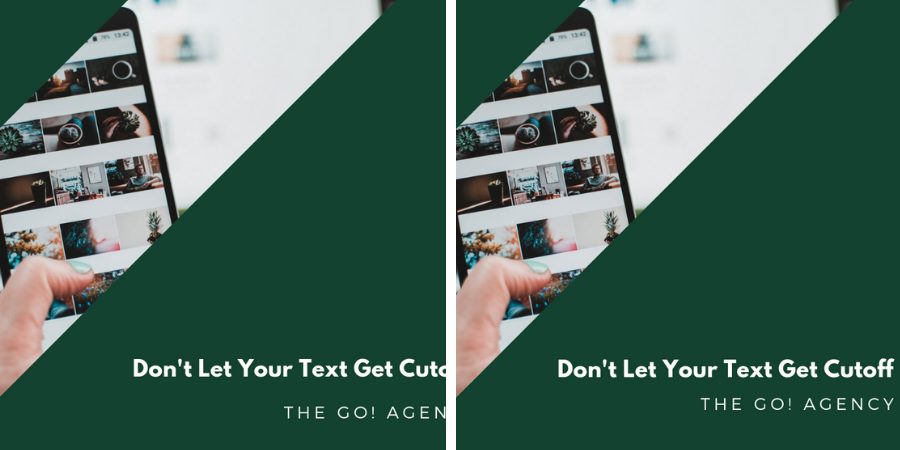
In our first visual, there’s a nice picture presented in an interesting way, but none of that matters once you notice that the text is cutoff. It makes the poster look amateurish, which is never a word you want associated with your brand!

In the second image, the text is in its proper place and you can fully appreciate the image and layout that the graphic designer chose. This visual is much more likely to earn some clicks!

3. Kerning

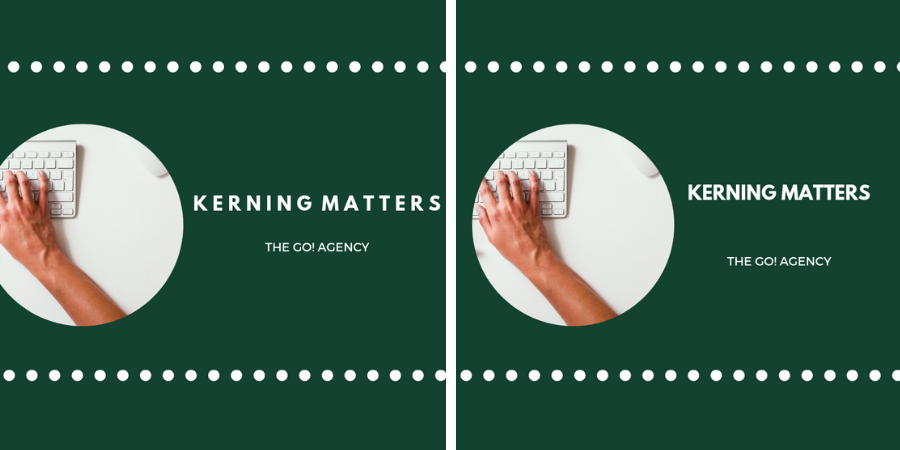
Kerning is the spacing between letters/characters in your visual, and it plays a huge role in how your work is received.

Look at the first design. There’s so much space between the letters that the text is right against the border and the edge of the image is cutoff. As a result, the whole thing looks like a crowded mess.

The second image tightens up the kerning, leaving plenty of room for both the visual and the text. Instead of cramped, this visual feels well-crafted and perfectly spaced!

4. Overcrowding

Sometimes, visuals just have too much going on!

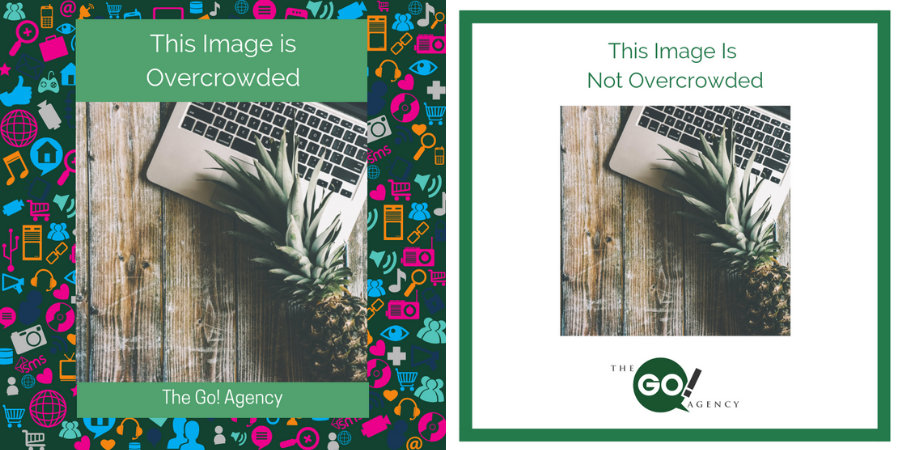
The first visual’s funky background makes the entire thing feel too crowded. Your eye isn’t sure where to go, and your social media following would quickly tell you that your visual gave them headaches!

The revised visual is much more pleasant. There’s plenty of empty space, and your eye can much more easily focus on the central image.

5. Legibility

As a graphic designer, you have to carefully pair the color of your font with the image!

The text in the first image is clear—until we lose it in the trees and the woman’s hair. Because the graphic designer didn’t consider how a dark green font would look against leaves, you lose the tail end of the message.

The green text looked great, so our graphic designer fixed this by changing up the spacing. You get a clear, legible visual without sacrificing text that fits the image’s background!

6. Justification

In design, justification is how text/graphic elements are structured. For example, if text is “right justified,” it will all start from the right side of the visual.

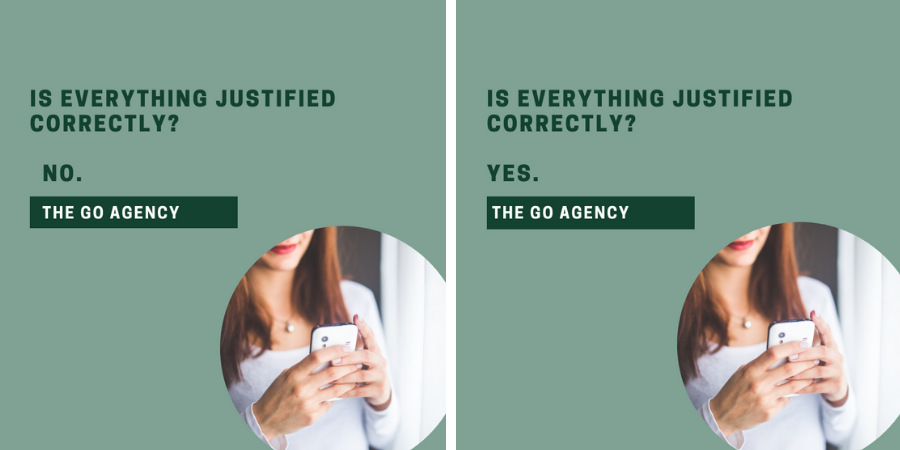
This is where we enter the uncanny valley—something looks off, but the reason may not be obvious at first. In our first image, the text is all slightly mis-aligned, with the “No” slightly off from the preceding line of text.

Our second image changes everything to be left justified, and the entire visual is better for it. It looks crisp, orderly, and doesn’t make you scratch your head and wonder, “What’s wrong here?”

Invest In Your Visuals
There are a lot of elements that go into great graphic design, but it’s important that you keep them in mind! You wouldn’t skimp on your written content, and visuals are at least as important!

Could your visual content use some help? Schedule your free consultation with The Go! Agency!

Click Here to Subscribe

Read More

The Essential Social Media Manager Tools

The Essential Social Media Manager Tools
7Nov

You’ve set up your social media pages and you’re ready to get posting, but you’re quickly finding that keeping up with all these different platforms is next to impossible. It’s a common feeling among social media managers, and there is a solution!

In a word: tools. There are plenty of great resources out there to make your job easier and let you get ahead on your social media strategy!

I’m going to share the social media management tools that my team uses every day to make sure our clients’ pages are running smoothly and getting them closer to their goals!

Scheduling
Nobody has the time to go through and publish each individual post at just the right time every day. So what’s the solution? Scheduling tools! These little guys can let you write up a bunch of content, then schedule it to post at specific times on your preferred platforms:

  • Hootsuite: This is one of the most intuitive scheduling tools out there!
  • HubSpot: If you want a scheduling tool with all the bells and whistles (including monitoring your content’s performance metrics), this is the program for you.
  • Buffer: While not quite as well-known as the other items on this list, it’s a great program if you find that the other options aren’t suiting your needs.

Instagram is notoriously finicky for its scheduling, which is why you should consider using a tool that’s optimized for Instagram. I’d suggest:

Photos
Need to find stock images for your visuals? I’ve got a few resources that have always done right by us:

  • Pixabay: Want a huge, international stock of public domain photos, graphics, and footage? Look no further!
  • Unsplash: More than 70,000 photographers post their content here, all copyright-free under the Unsplash license!
  • Pexels: Another great source for public domain photographs!

Design
You’ve got your images, but how do you alter them to create your own unique, branded visuals? Try these tools:

  • Canva: This is a great tool for beginners, as it’s popular among professional and rookie graphic designers alike!
  • Photoshop: If you’re comfortable using more complex programs, this tool should be right up your alley!
  • Animoto: This is one of the top platforms for creating video slideshows and other short, moving content!
  • Ripl: A comparable product to Animoto, Ripl makes it easy to create animated visuals!
  • PicMonkey: Want to go back to basics? PicMonkey is a no-fuss image-editing program that’s also great for graphic design!

Writing
Writing up heaps of copy and content is no walk in the park! Creating content takes time, which is why I recommend not just creating original content for your business but also curating content from other sources. Instead of searching the internet for hours, these tools gather the content into one spot for you!

  • Feedly: Feedly lets you search by topics and pulls up great, usable content to help springboard your ideas!
  • Grammarly: To proofread any technical issues you may have missed!
  • Google Alerts: Set up alerts on industry-relevant keywords to make sure your writing is current and following trends in your field!
  • Hootsuite Streams: Track keywords and hashtags to see what others in your industry are posting. If you know what your competitors are talking about, you can figure out how to fill in the gaps they’re missing!
  • Hashtagify: Not sure what hashtags will get you attention? Use Hashtagify to track the impact of a hashtag and see what’s best for your posts!

When linking to another site, it’s important not to include the full URL. Many link shorteners allow you to see how many times the link has been clicked, which can help you track how your audience responds to content. Use any of the following tools to get shortened, convenient URLs for your posts:

Don’t Feel Overwhelmed
Being a social media manager is stressful, especially if you’re not using the right tools. Skip that anxiety and use these resources to make sure you’re not only doing your work efficiently, but as easily as possible. No social media manager can be successful without a little extra help, and that includes you!

Do you feel like you could use a little extra help? You can have a free consultation with our team of marketing experts!

Click Here to Subscribe

Read More

7 Social Media Marketing Things You Should Know but Don’t

7 Social Media Marketing Things You Should Know but Don't
5Nov

Social media marketing is constantly in flux, and it doesn’t look like that’s going to change anytime soon. The best practices of yesterday are painfully outdated now. As a marketer, you’ve got two options: fall behind your competition, or stay sharp!

I’m going to share the seven biggest things across social media that every marketer should know—but most don’t. Let’s see how up-to-date your knowledge is!

1. You Need Tools
Social media management tools aren’t just flashy programs for people with money to burn. They’re an integral part of social media marketing, and if you’re not using them, odds are you’re falling behind.

Unless you like the idea of manually posting multiple updates across social media every day, writing error-ridden content, and having low-quality visuals, you’re going to need some help!

2. You Need to Curate Content
Thinking of fresh, original content every day isn’t going to work if you’re not seeing what other people in your industry are posting. Content curation lets you share relevant, valuable news with your followers and can give you ideas for how to produce your own unique content!

3. You Need to Understand Metrics
Nobody likes to learn a lot of jargon, but it’s there for a reason. In marketing, it’s not enough to just “go with your gut.” You need to have hard, quantifiable data to support your social media marketing strategy, and having a working understanding of metrics and when to track them is the only way to get that information.

4. You Need to Work on Visuals
Graphic design often gets pushed aside by marketers who chant the Bill Gates quote, “Content is king.” And sure, your written content is important, but nothing can replace the impact of quality visuals. Think about it: Would you read a blog with Pulitzer-worthy writing that looked like its visuals were made by a toddler? Of course not, because you never would have clicked on their content to begin with!

5. You Need to Find and Engage With Your Audience
The appeal of social media marketing is that you can target specific consumers who are most likely to buy from you, so why wouldn’t you make the most of that? By creating buyer personas and optimizing your engagement for your audience’s preferred social media platform, you can make your campaign much more effective.

6. You Need to Watch Your Competitors
It isn’t enough to just look at your own successes and shortcomings. Your competitors are, by definition, appealing to a similar market, so see what you can learn from them! By tracking their movements on social media, you’ll double your opportunities to improve your own strategy!

7. You Need a Checklist
If you’re running a multi-platform social media campaign, you simply can’t keep it all straight in your head. There are too many moving parts for anyone to remember every little thing! By keeping a checklist and running through it on a regular basis, you guarantee that nothing will slip through the cracks!

Don’t Stop Learning
These are essential parts of social media marketing, but it’s not enough to stop once you’ve mastered these! Take this information as a way to get you started. From there, keep reading! Social media will never stagnate, and neither can your understanding!

Everyone could use some help staying competitive on social media. If you’re not sure what to do, just schedule your free consultation with The Go! Agency!

Click Here to Subscribe

Read More

The Essential Guide to Facebook Live Broadcasts

103118 The Essential Guide to Facebook Live Broadcasts
31Oct

No matter what industry you’re in, there are probably a hundred other businesses who do more or less the same thing that you do. You can tout your special features and advantages, but ultimately, convincing someone to choose your business is going to largely come down to how you connect with them.

The good news is that you can use Facebook Live broadcasts to create completely unique content that sets your business apart. Even if there are a dozen other breweries selling ales that are identical to yours, they can’t replicate your personality! Your style, your tone, your energy; those are the qualities that will draw in customers.

Your Facebook Live broadcast only works if you can create something worth watching, though. Awkwardly shuffling in front of a camera and muttering for fifteen minutes just won’t cut it. That’s why I’m giving you the complete guide to Facebook Live broadcasts!

Have a Strategy, but Don’t Over-Plan
You don’t want to go into your broadcast with no idea what to talk about. At the same time, your audience will be able to tell if you just memorized a script, so don’t be afraid to speak organically.

A good method is to go into your broadcast with a few bullet points that you want to hit. This way you can have a real conversation with your viewers without meandering onto the topic of politics in Uzbekistan during your broadcast about your new IPA.

Set Up Before You Go Live
Nobody wants to watch you orient your camera for the first three minutes. Before you even think about starting the broadcast, make sure your camera is set up so that it’s straight and you’re in the center of the shot.

Think beyond just you and your camera, though. How’s the lighting? Nobody wants to buy products from a washed out vampire, so make sure you’re brightly lit without draining the color from your face.

And what is your area like? Think of what background would best suit your brand. Are you a grungy, casual brand that can get away with a more casual backdrop, or should you be recording this in a meticulous office? Regardless, clutter and dust are probably things to clear away before you go live. If your viewer is focused on the messy space around you, they’re going to tune out your message!

Once your equipment and setup are ready to go, give yourself a test run! There will be hiccups the first time you try anything, so why make your viewers watch a subpar version of your broadcast? You can set your broadcast to be viewable by “only me,” run through your ideas, then look back at the recording. This is a great way to find and fix any awkward sections!

Be Charismatic
I said that your audience will respond to your style, tone, and energy, and that’s true, but only if you have a personality.

Meaning, don’t shift anxiously throughout the broadcast. And please, for the love of God, don’t keep promising that you’re “just about to start once a few more people join!” Nobody wants to wait for you to get to the point, and you’ll most likely end up losing viewers who got sick of watching you stare at the screen.

If you do need to wait for something, at least make it interesting. A good strategy to keep people engaged with what you’re saying is to give them a teaser for your next topic. “Okay guys, in 30 seconds I’m going to give you the micro brewing secret that nobody else will tell you.” This is also a good tactic if you notice your viewer rate is dropping off before you finish one of your points.

In that same vein, engage with your audience! Say hi to people in the beginning, and answer relevant questions as they come up. Facebook Live is a unique opportunity to speak one-on-one with your customers, so don’t waste it!

Get Filming
You can sit around and plan forever, but your best move is just to get started. Use this guide to troubleshoot any Facebook Live roadblocks you come across. Now get out there and show your audience what sets your brand apart from your competitors!

Do you want to talk specifics with planning your Facebook Live broadcasts? Set up a free consultation with The Go! Agency!

Click Here to Subscribe

Read More

The Essential Guide to Facebook Ad Split Testing

The Essential Guide to Facebook Ad Split Testing
29Oct

As you plan your Facebook marketing strategy, how do you decide between one image style or another? Or find out what sort of ad copy your leads prefer? You could guess blindly, but you’ll be better off with split testing.

Split testing (or A/B testing) is the practice of sending out different ads to different sections of your audience. So Group A gets ad one and Group B gets ad two. From there, you can see which ad performed better, which informs the rest of your advertising strategy going forward.

Why is split testing worth it? How do you make an effective split test? I’ll go over the answers to those questions and more in this guide to creating successful Facebook ad A/B tests!

Why Bother?

For many people new to the idea, split testing seems like a waste of time and resources. Who wants to write double the ad copy and generate twice as many images? Well, as it turns out, you do.

Split testing has become an advertising best practice across the industry for a lot of reasons, but in short, it makes sure that your ad campaign is on the right track.

For starters, it’s an essential part of overall better marketing. If it turns out you’ve been appealing to people with the wrong angle, then you need to change that direction ASAP. Once you’ve made these corrections, you’ll probably see your web traffic, engagement and conversion rates all increasing.

This then translates to increased ROI. Basically, $100 of subpar ads may only generate half the attention that $100 of tested and optimized ads gets you. It’s a bit of extra effort now for increased effectiveness and revenue later.

So you know why you should be split testing your Facebook ads, but how do you get started?

Have a Goal and Expectation

Before you start writing up any ad copy, you need to determine what you want to test. Do you want to try a new headline style, or maybe you want to see what kinds of images perform best with your audience? Whatever it is, set one thing to alter. That way you’ll know exactly what changed your audience’s reaction between the ads.

This is where marketing and science start to blend. Form a hypothesis! Which ad do you think will perform better? Why? During this step, you’ll also want to establish what a successful split test will look like for you. If you’re advertising for your online store, maybe a 7% increase in site visits is a good goal for you.

Create the Ads

Now, draft your two ads with the one major difference. And really, it needs to be a MAJOR difference!

For example, let’s say you’re marketing for a gym and you decided to test the images used for your ads. You’re not going to have meaningful results if your first ad has a picture of a smiling, fit woman stretching and your second ad features a smiling, fit woman lifting weights. They’re just too similar to tell you anything important.

Instead, you might have your first ad feature the same woman sitting down, but your second ad could feature shots of your equipment or pictures of healthy foods and protein powders. This way, when one ad performs better than the other, you’ll know it isn’t just a coincidence!

Send Them Out and Analyze the Data

Now, publish your two Facebook ads and see what happens. Set which metrics you want to track based on your goals for this test, and may the better ad win!

Let the ads run for a set amount of time, however long your ads usually take to see optimal engagement, then step back and look at your results. If one ad outperformed the other, use this information as you plan your ads in the future!

If there weren’t significant results, don’t be discouraged! Make sure you made substantial changes between the ads or (if worst comes to worst) test a new part of your ads! There’s always something to improve on, and these tests are important to optimizing your processes.

Test, Test, Test!

The only way to improve is to identify problem areas, so get to work! You’ve got nothing to lose by testing, and a whole lot of revenue to gain!

Would you like to discuss your unique Facebook ad strategy? Schedule your free consultation with the marketing experts at The Go! Agency!

Click Here to Subscribe

Read More

3 Ways to Get Your Shopify Store Holiday-Ready

3 Ways to Get Your Shopify Store Holiday-Ready
22Oct

You’ve put a lot of work into your e-commerce platform throughout the year, but have you thought about what you’ll do for the holidays?

It isn’t enough to quietly lower your prices. There are a lot of Shopify stores out there, and you need to stand out! Thankfully, there are some simple steps to ensure you’re making the most of of the holidays.

Let’s talk about how you should customize your Shopify store for the winter sale season!

1. Start a Holiday Sale
This one is a no-brainer. Holiday sales are inseparable from the winter shopping experience, and frankly, most shoppers won’t consider your Shopify store if you’re not running a seasonal sale.

To set sale prices, you’ll click on the individual product you want to discount, and you’ll have two options, “price” and “compare at price.” The “price” box will be the sale price, and the other box will be its price outside of the sale. This is a classic marketing strategy. When interested shoppers see how much they’re saving with your sale, they’re more likely to jump on the chance to get your products at a lower rate!

Once you’ve set up your sale dates and prices, don’t stop there! For loyal customers on your email list or new shoppers who sign up for it, why not show them a little extra love with some coupon codes?

2. Prepare Coupon Codes
Special discounts give people that extra push to give your store a try. After all, what do online shoppers love more than a bargain?

You can create coupons for a specific dollar amount, a percentage off an order, or free shipping. Your Shopify discounts will also have a programmable range of dates when the codes can be used, the number of coupons you’ll accept per order, and any order minimums for your discounts.

A word to the wise: Test your coupon codes! If your customers go to checkout and their coupon codes won’t apply, they’ll be so frustrated that they’ll never spend a dime at your store.

Before sharing the coupons, create a buyer’s Shopify account and try to make a purchase from your store. If the code works, then full steam ahead! If you’re getting an error message, you may need to reach out to Shopify’s support team for help.

3. Limit Your Coupons
Remember how I said you can limit the number of coupon codes for each order? Yeah, you’ll want to make that a priority.

Let’s say you’re offering 3 different coupons: 15% off the order, $10 off all orders over $50, and free shipping. Individually, each of those coupons is an incentive for your customer to spend more money at your store. But together? Their $60 order is only costing them $41, and you’re left on the hook for shipping.

By programming your Shopify checkout to only accept one coupon at a time, though, your customers can choose which discount best suits their needs without completely draining the transaction of any profit.

Deck the Digital Halls

It’s a lot of work to get your Shopify store ready for the shopping season, but it’ll be worth it. Apply these tips to your e-commerce shop and you’ll be set to enjoy a holly jolly sleigh ride straight to the bank!

Do you have some lingering questions about optimizing your store for the holidays? Talk it out with the experts at The Go! Agency!


Click Here to Subscribe

Read More

Your Metrics System: How to Track Results

092618 Your Metrics System_ How to Track Results
26Sep

You’ve done it! You created and survived your holiday marketing campaign!  While it would be nice to revel in the feeling of accomplishment, you’re not done yet.  

“But the campaign was a success!” You say, “we earned so much money! What’s left to do?”

Nothing much . . . only determining if your campaign was actually worth the time, money, and energy you spent on it.

I hear this sentiment all the time from business owners. After they’ve dipped their toes in the marketing world for the holiday season, they decide to leave the pool until the next fall. 

“Why would I ever need to know all those marketing stats?” They ask. 

This attitude will doom your chances of long-term success. These metrics affect your business, your brand, and your bottom line.

Those “marketing stats” will help you in a myriad of ways. They 

  • are necessary for calculating your return on investment (ROI);
  • give you valuable demographic information;
  • help you determine your upcoming budget; and
  • give you insight into and ideas for your future marketing initiatives.

Here are a few metrics you should consider measuring at the end of your holiday marketing campaign.

Impressions are the number of times an individual person sees a piece of content (ads, tweets, updates, blogs, etc.). This is an awareness metric. Although impressions are important, it can be a vanity metric. Focus on the quality or the effect of the impressions. How many times did a person see your ad before taking an action? 

Reach refers to the number of people who saw your ad. I’ve already discussed how important it is to target the right audience, and this metric lets you see if you hit your target! Did the social media network, website, and/or publication you chose for ads live up to your hopes? Did you get the customers you expected, or did you see a boost in traffic from an unexpected demographic? For instance, video games are marketed to teenagers, but parents are usually the people who actually buy them.

Engagement is, essentially, interaction. It shows that your audience actively participated in your content. Likes, clicks, shares, comments–all of these are ways your audience engages with your brand. Think of engagement as the active result of reach and impressions!

Click Through Rate (also known as CTR) is found by dividing the number of individuals who clicked a link or ad on your webpage by the total number of users who viewed the page. If your page was viewed by 380 people, and 7 of those people clicked the link to your storefront, then the click through rate would be 1.84 percent. That CTR isn’t horribly low, by the way. According to Hubspot, search ads average a CTR of 1.91 percent and display ads have around .35 percent.

Conversions are actions taken by visitors. These actions can include completing a purchase, filling out a survey, or subscribing to an email newsletter. Tracking conversions enables you to retarget consumers. In retargeting, you present ads to consumers who visited your page but did not complete an action (e.g., added items to the digital shopping cart, but never paid).

All of these metrics will vary according to your goals. Too many novice marketers make the mistake of only analyzing these metrics after the holidays or another big campaign, but that is asking for trouble. You need to do this throughout the year! Take stock of where you are so that you can get to where you want to go!

Voilà! I’ve told you everything you need to know about running your holiday marketing campaign! If you have additional tips (or cautionary tales), share with us in the comments below. Don’t hesitate to reach out to me if you have any questions about digital marketing, seasonal campaigns, or one of my many Christmas cookie recipes!

Do you need more help with your holiday marketing campaign? Don’t wait for a Festivus miracle! Contact The Go! Agency today for your free consultation! 


Click Here to Subscribe

Read More

Creating Your Timeline for Holiday Marketing

092418 Creating Your Timeline for Holiday Marketing
24Sep

The holiday season is just a few weeks away! So far, I’ve told you what you need for your holiday campaignhow to target your audience, and where you should focus your budget, among other tips from my years as a marketer. Now I want to address the schedule. 

Your holiday marketing campaign isn’t a high school project: you can’t expect to reach your goals if put everything off until the last minute. You need deadlines! I’ve found that there are three pillars for a good deadline. Good deadlines must be . . . 

1. Good for Your Budget: The deadline must fit within the confines of your budget. Will you have enough money to run ads for a given amount of time? Will you have enough in the budget to cover your personnel needs until a specified date? These are the questions you’ll need to consider.

2. Good for Your Bandwidth: Speaking of personnel, you must give your team deadlines that are reasonable. Don’t assume that your staff will be able to pull off a Christmas miracle! Factor in human error and human nature by giving yourself and your staff a buffer. Never set deadlines at the last possible minute! 

3. Good for Your Campaign’s Effectiveness: Will this deadline further your goals? In other words, are you spinning your wheels? Determine which actions are priorities, and which actions can be postponed.

Let’s start with a list of everything you need to accomplish or complete for your campaign. You’ll notice that some of these lead into the next item (i.e., you cannot complete Y until X is done). Generally, holiday campaigns include:

  • Final Strategy: When will you have your final plan? This is the blueprint that you’ll be sticking to for the entire campaign; so while you can (and should) be flexible, your campaign plan should be complete.
  • Budget: When will you have your budget ready? Do you need to hire any contractors or agencies to take on extra work of the campaign? It might sound silly to include deadlines for strategy and budget, but it will help you keep an analytical perspective toward your campaign.
  • Creative/Visuals: When do you need your final designs? This aspect includes layouts for ads and any new website or landing page visuals. Do you use a contractor for design work? Remember that contractors might book up quickly for the holiday rush!
  • Copy: When do you need all of your campaign’s written content? This should include landing page copy along with advertisements, posts, and blogs. You’ll need to account for editing content in addition to the approval process for ads.
  • Advertising: There are a few aspects to keep in mind here. The first is practical: what is the deadline for submitting ads for a given publication, website, or platform? The second aspect to consider is when will your ads have the greatest impact? For example, you can’t expect a lot of engagement from a Cyber Monday sale ad if won’t be approved until Tuesday morning.
  • Website Landing Page: You could generalize this to your entire website, but focus on the landing page for your holiday promotion or campaign. When will you need to have it up and running? If you use a contractor or another third party entity for your web design, what is their turn-around time? Will the holidays affect their schedule and availability? 

Finally, you should consider the timing of your overall campaign. The timeline for a campaign that peaks on Black Friday is drastically different from a timeline for a campaign that peaks during the week of Christmas. 

Armed with my advice, creating your campaign timeline should be a breeze! I mentioned this already, but it’s important enough to repeat: keep your plans firm, but allow for some wiggle room! Life happens. You realize that your copywriter will be out of town for Hanukkah. Your social media manager is hosting a horde of relatives and cannot work any overtime. Your IT guru will be on PTO all of Thanksgiving weekend–and you approved her request back in March. 

This guide should help you create the optimal timeline for your holiday marketing campaign! Now let’s go!

The holidays are coming in fast–is your marketing strategy ready? The Go! Agency can help you get results! For a free consultation, contact us today! 

Click Here to Subscribe

Read More

Contests, Promos, & Giveaways: What You Should Know

091918 Blog Contests, Promos, & Giveaways_ What You Should Know
19Sep

Whether your business centers on a product or a service, the holiday season is filled with opportunities. But how can your marketing compete when all of your competitors are pushing for the same clients? Why not incentivize your customer with a contest, promo, or giveaway?

In my years as a marketing expert, I’ve noticed that companies fall into one of two camps when it comes to incentives. The first camp consists of the anti-incentives crowd. These brands might feel that giving a free incentive would denigrate their product or service. They believe that such promotions (or even discounts) could damage the brand even if they attract new customers. Antis see incentives as pandering to their consumers. The second camp is filled with pro-incentives people. Such brands believe that people love free stuff, therefore free stuff will attract customers. This group is all about giving away promotional materials, too. (Coincidentally, brands like these are the reason we have uniquequirky, and just plain weird marketing swag.)

Both sides make fair points. You don’t want your brand to appear aloof, but you don’t want customers to take you for granted, either. There’s a way to balance both. Let’s discuss contests, promos, and giveaways, along with incentives!

Contests are events in which individuals (or teams) compete for a prize. They are a great way to get user-generated content (UGC). Often, brands will ask customers to post pictures or create videos that meet certain requirements. 

Tagline: “Send us your best pic, and the winner will receive an all-expenses-paid cruise!”

Promos (short for promotions) are limited-time offers or events that are held to encourage consumer engagement. Brands want to attract new customers, so they’ll offer free shipping for a given time period. Some companies offer discounts to new users or members. In several U.S. states, the school year is preceded by a “tax-free weekend,” in which the government forgoes sales taxes in an effort to increase back-to-school shopping at local establishments. 

Tagline: “Buy-one-get-one-free sale on pens this weekend only!”

Giveaways are when a brand gives an item or provides a service free of charge to consumers for promotional reasons. These can range from a free gift with purchase to giving out promotional swag to passersby. 

Tagline: “Free gift with every purchase!” 

As you decide what you want to do, you need to think about the following points.

1. Competition 
This point could just as well be labeled “research.” Find out what your competitors are doing. While you want to stand out from the crowd, knowing industry norms will keep you from looking reckless or foolish. For example, a Porsche dealership wouldn’t hold a buy-one-get-one (BOGO) for free deal on cars, but they might throw in free oil changes and other maintenance for the lifetime of the vehicle.

2. Incentives
There are actually two types of incentives. The incentive could be a reward, i.e., something that could be considered a bonus. With the above example, a reward might be the inclusion of an official Porsche crest keyring. The incentive could be a motivator, i.e., something that would push your audience through the decision process faster. In the previous example, the free maintenance acts as a motivator. The great thing about the types is that you can combine them or use them concurrently. One final note on incentives: it should be something complimentary to your service or product. An insurance company might give out a free umbrella to new clients, for instance.

I personally believe that incentives can be great for your brand’s sales and reputation. I’ll leave you with a story that, to me, proves the value of an incentive.

The Go! Agency handles the marketing for a franchise of assisted living facilities. One challenge they faced was that caregivers of potential residents who toured their properties would love what they saw, but choose another home for their loved one. These decisions were often based on price and other factors that our client could not control. We decided to add value to the tours by creating an ebook that explained what you should ask about a potential assisted living facility. At the end of each tour, the guide would say, “I know that you’ll probably continue looking around and researching your options. We totally understand–you want to find what’s best for your family! Anyway, the website has a link to an ebook we’ve written. The book gives you some questions that we’ve had people ask time and time again. We’ve chosen the most important ones, so it should be useful if you tour another residence.”

BOOM

By sharing knowledge, our client is now an expert. 

BOOM

By trying to help out caregivers, our client is now a resource.

BOOM

By emphasizing that they understand, our client has now endeared themselves to that family.

All because of an incentive. 

Contests, promos, and giveaways are great for encouraging engagement from your audience and drawing attention to your brand. You can do so much with these events, both in terms of money made and buzz generated. 

Do you need help with with an event, or your overall marketing strategy? Discover what my team of marketing experts can do for your brand! Contact me today for a free consultation!


Click Here to Subscribe

Read More
×