
What a Graphic Designer Can Do for Your Business

What a Graphic Designer Can Do for Your Business
4Feb

You need a graphic designer—no ifs, ands, or buts. But what do you have them do once they’re hired on? Before you start sending job offer letters, it’s best if you figure out what your new employee will be doing.

Since you don’t want to hire someone without having work for them to do, I’m going to show you exactly what projects your new graphic designer should start with. Let’s talk (photo)shop!

Create a Branded Style Guide
Graphic design is so much easier when everyone is working off the same page. For this reason, you should have your new hire create a branded style guide that breaks down exactly what your visuals and graphics will look like going forward. This way, you can approve the style and make sure it’s conveying the message that you want for your brand, and your graphic designer will know what they need to deliver to make you happy!

Create a Logo
If you don’t already have a logo (or you have one you made yourself), then this should be where your graphic designer starts. Your logo is going to be prominently displayed on your website and across all social channels, so it’s important that you’re presenting something appealing for your audience! This also helps establish your branding color palette moving forward.

Create Email Signatures
You might not believe it, but email signatures go a long way in making sure that correspondences with your business are more professional and respectable. A professional will make sure that the signature is aligned with your business’ color palette, font, and overall style! Your emails will also be a lot more impactful once you have a professional signature!

Click Here to Subscribe

Create Ebooks
By working with your copywriter, your graphic designer will be able to combine great content with visuals that keep your readers moving through the ebook. Mixing text and visual materials is not only a great way to make sure your reader understands your points, but it breaks up the ebook and makes it easier to read!

Create Videos
Whether you want an animation or just a high quality video to showcase your business, this is all in the realm of graphic design. Video content is more popular than ever, so start pushing out some video content! Don’t overdo it, but it would certainly be worth your time to have your graphic designer create a few short videos and see how they perform on your social media channels.

Create Building Branding Elements
Whether you’re a brick and mortar store or an office, you’re going to have clients/customers stopping by eventually. Make sure that your location looks like it belongs to your brand! Your graphic designer can make room tags, signs, and other materials that will bring your brand’s identity into your physical location.

Create Name Tags
Never underestimate the power of a good name tag! Your name tags should follow your brand’s color palette and feature some sort of visual—preferably your brand’s logo. This way, when you’re interacting with clients or customers, they know that they’re dealing with a professional and are more likely to take you seriously!

Don’t Wait to Get Started
We’re still early in the year, so take this opportunity to try something new for your business. It might be a little pricy, but paying now is better than investing in subpar social media and branding work! You know why you need a graphic designer, and now you’ve got a list of tasks for them, so there’s no reason not to dive in and make this investment for your business!

Do you want to discuss what you can expect from your new graphic designer? Schedule your free consultation with The Go! Agency!

Click Here to Subscribe

Read More

5 Reasons Why You Need a Graphic Designer

5 Reasons Why You Need a Graphic Designer
30Jan

Visuals are a vital part of social media marketing. As humans, we’re not just lazy and refuse to read—our brains are hardwired to better retain visual information. So while we’ve established that you need a writer and even given a few suggestions about work you should have them do, none of that is going to take you very far without a competent graphic designer!

You want to get a great return on your investment into digital marketing, and I’m here to make sure that happens. Here are five reasons you need a graphic designer right now!

1. First Impressions Matter
Before you’ve fully formed an opinion about something, your first impression has already been decided. The instant you see a site without a consistent color palette or a blog post without accompanying visuals, you’ve already decided that what you’re looking at is amateurish and probably not worth your time.

A graphic designer changes that entire experience. The homepage is crisp, clean, and comes together to create a visual narrative. The blog comes with a relevant image that helps you understand the sort of content you can expect when you click the link. In short, your work stops looking shoddy and lazy and instead appears well-crafted and professional!

2. Your Brand Needs an Identity
Your copywriter will help you develop a unique voice for your brand, but that voice needs to extend to your visuals, too. Acting on your own, your visuals will probably lack the consistency that develops your brand identity, and your audience will be unsure of who you are or what your business’ angle is.

Conversely, a good graphic designer can keep certain elements the same in visuals, which will build your brand’s voice. If you’re operating a brewery, your graphic designer would probably use photos of people in their 20s and 30s rather than images of people 60+. This tells your audience that your brand is youthful without you ever saying a word!

Click Here to Subscribe

3. Grab Attention
Let’s be honest—people are rarely paying attention to what they see when they’re scrolling through social media. Great copy is informative and draws the reader in, but only if they stop to actually read it. Visuals are better for grabbing attention!

Visuals give information in an instant rather than the few seconds it takes to read. If you see a man picking up a can of soda, you’ll understand what’s happening much faster than if you read my description of what he’s doing. Saving that time is key to getting your message across before a social media user swipes past your post!

4. Vary Your Content Mix
There are certain kinds of content that really only work with visuals. Quotes are a great example! An inspirational quote is very shareable content that showcases your brand’s values, but it’s pretty dull without an accompanying graphic. Once you add in a visual, though, it instantly becomes a viable way of encouraging your audience to engage with your brand!

Graphic designers also allow you to post videos, graphs, and a host of other content that would be impossible without a professional graphic designer on staff. If you notice that your competitors’ social media pages are looking a little bland or stagnant, this is a great way to get ahead of them!

5. Things Look Clean
I’m sure that there’s at least one person reading this who’s sure that they could handle all of this graphic design work even though they have little to no experience. To that person, I respect the confidence, but the reality is a little different.

Good graphic design means monitoring visuals for consistency with brand image, kerning, spacing, style, color palettes, and a thousand other things that nobody but a professional has the time or experience for. So sure, you could probably post a stock image of a woman laughing, but that’s not nearly the same as having a professional on staff creating quality, compelling visuals for your brand.

Find the Right Professional
It’s tempting to cut corners on things like this, but that’s only going to hurt your business’ social media in the long run. If you want to manage your own social media, then there’s nothing to do but bite the bullet and hire a professional. You’ll be glad you did when your page has consistent, polished visuals going out!

Do you want to discuss the realities of hiring a graphic designer? Schedule your free consultation with The Go! Agency!

Click Here to Subscribe

Read More

The Essential Guide to Visuals

The Essential Guide to Visuals (17)
19Nov

The best piece of content in the world will never get clicked on without a good visual. Of course, this begs the question: What makes for a good social media visual?

Well, there are a lot of things that factor into image quality: white space, kerning, and several others. But if you’re not an experienced graphic designer, just describing these issues isn’t going to tell you very much.

I’m going to show you real examples that my team made of good graphic design practices vs shoddy graphic design practices. Take a look!

1. White Space

White space is the empty part of a visual that gives it room to breathe. An image that’s crammed full of saturated colors and complicated patterns is going to exhaust anyone looking at it. On the flip side of that, too much white space makes your visual boring!

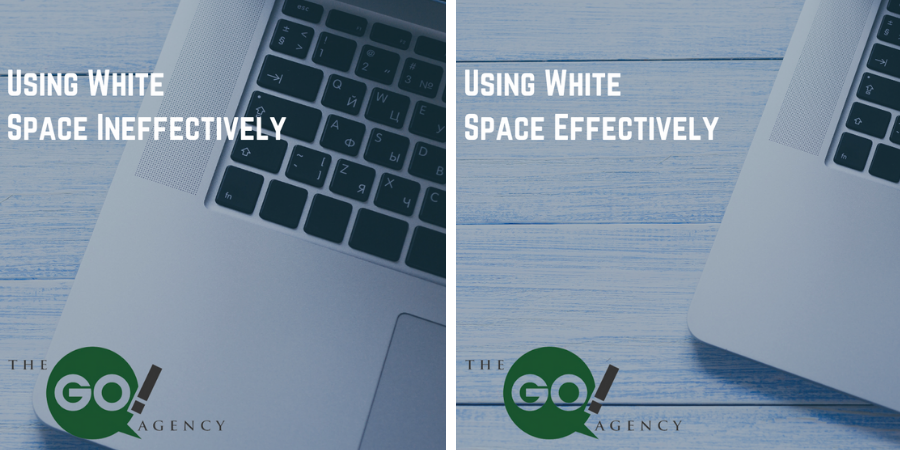
In this first example, the bad image has way too much white space. It’s boring, empty, and you’re only getting a glimpse of the one object in the image.

But white space is used much more effectively in the second image! It isn’t just a straight shot of the laptop, which would be dull to look at, but it balances the activity on the keyboard with the emptiness of the background and the rest of the laptop.

2. Text Layout

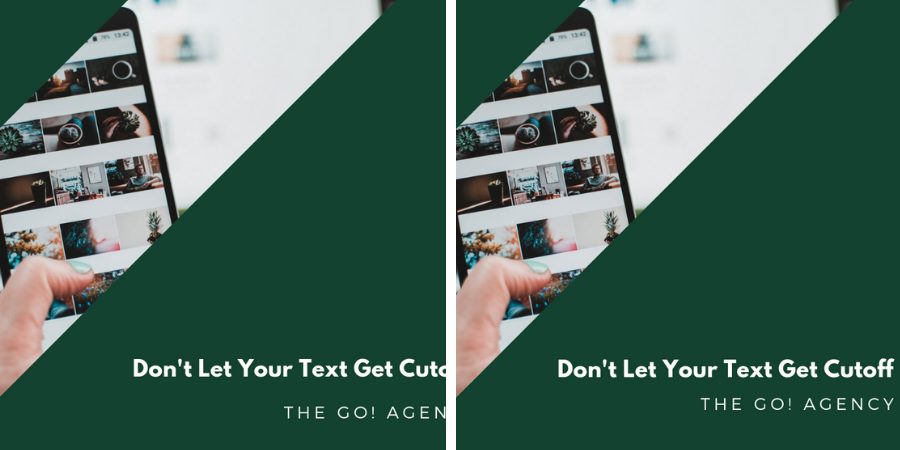
In our first visual, there’s a nice picture presented in an interesting way, but none of that matters once you notice that the text is cutoff. It makes the poster look amateurish, which is never a word you want associated with your brand!

In the second image, the text is in its proper place and you can fully appreciate the image and layout that the graphic designer chose. This visual is much more likely to earn some clicks!

3. Kerning

Kerning is the spacing between letters/characters in your visual, and it plays a huge role in how your work is received.

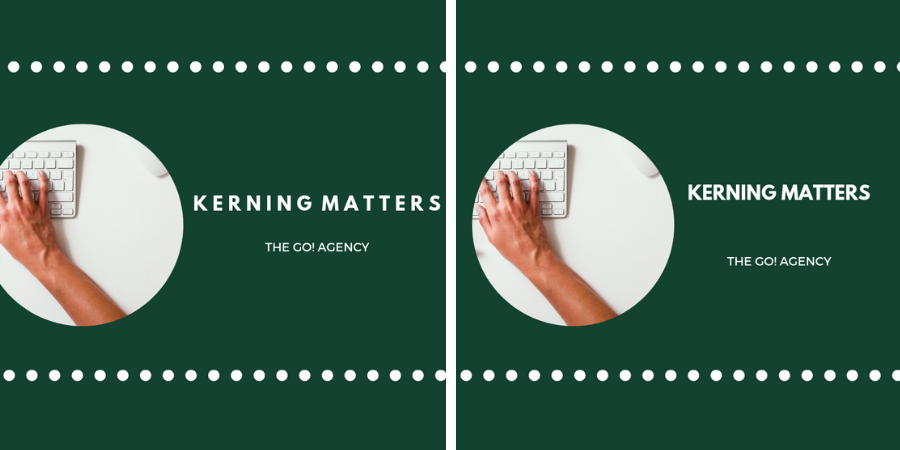
Look at the first design. There’s so much space between the letters that the text is right against the border and the edge of the image is cutoff. As a result, the whole thing looks like a crowded mess.

The second image tightens up the kerning, leaving plenty of room for both the visual and the text. Instead of cramped, this visual feels well-crafted and perfectly spaced!

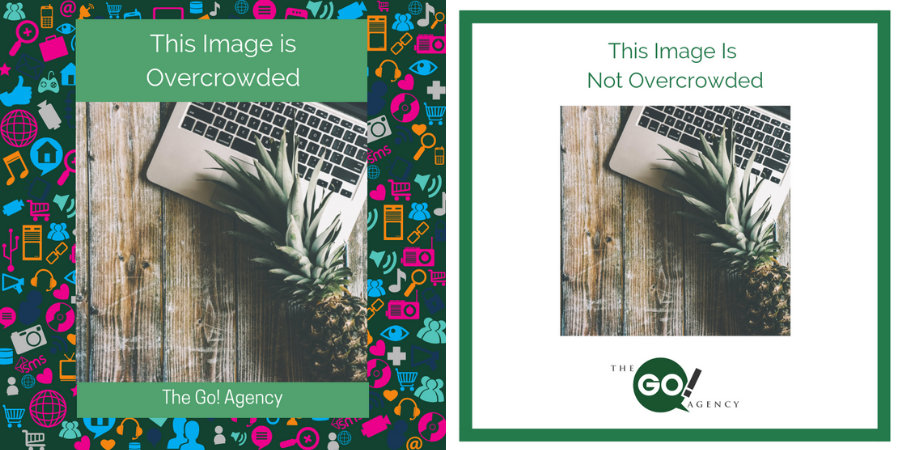
4. Overcrowding

Sometimes, visuals just have too much going on!

The first visual’s funky background makes the entire thing feel too crowded. Your eye isn’t sure where to go, and your social media following would quickly tell you that your visual gave them headaches!

The revised visual is much more pleasant. There’s plenty of empty space, and your eye can much more easily focus on the central image.

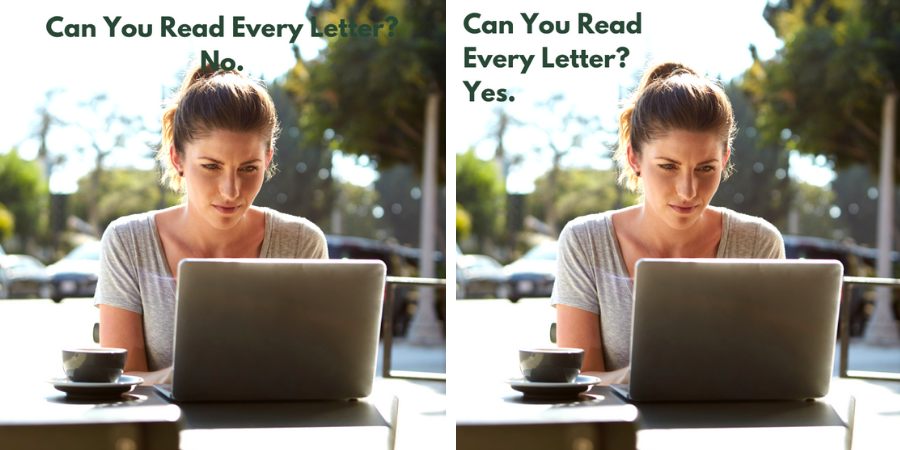
5. Legibility

As a graphic designer, you have to carefully pair the color of your font with the image!

The text in the first image is clear—until we lose it in the trees and the woman’s hair. Because the graphic designer didn’t consider how a dark green font would look against leaves, you lose the tail end of the message.

The green text looked great, so our graphic designer fixed this by changing up the spacing. You get a clear, legible visual without sacrificing text that fits the image’s background!

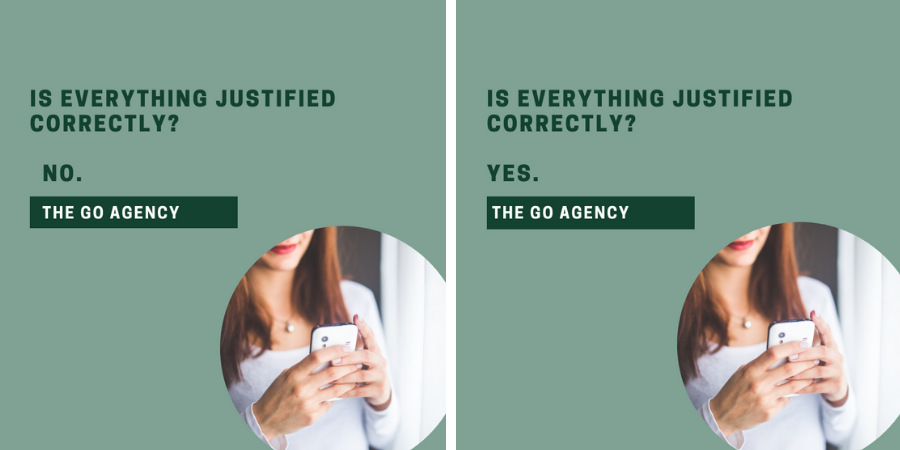
6. Justification

In design, justification is how text/graphic elements are structured. For example, if text is “right justified,” it will all start from the right side of the visual.

This is where we enter the uncanny valley—something looks off, but the reason may not be obvious at first. In our first image, the text is all slightly mis-aligned, with the “No” slightly off from the preceding line of text.

Our second image changes everything to be left justified, and the entire visual is better for it. It looks crisp, orderly, and doesn’t make you scratch your head and wonder, “What’s wrong here?”

Invest In Your Visuals
There are a lot of elements that go into great graphic design, but it’s important that you keep them in mind! You wouldn’t skimp on your written content, and visuals are at least as important!

Could your visual content use some help? Schedule your free consultation with The Go! Agency!

Click Here to Subscribe

Read More

What Is LinkedIn SlideShare?

Go-Agency-Blog-Template-3-1-200x300
12Dec

LinkedIn is all about marketing with your fellow professionals. It’s essentially the world’s biggest conference if you will. It’s one of the few social media platforms that didn’t branch out into areas that it was never intended for. LinkedIn is for serious networking, and that’s that. That being said, every now and again they come up with new and innovative ways to share your wealth of knowledge. That’s where SlideShare comes in.

SlideShare is a stand alone site, albeit one that works entirely through your LinkedIn profile. Here, users upload infographics, documents, and most importantly, slideshow presentations named slideshares with other professionals. There are tons of slideshares available for viewing on a multitude of subjects. Think of PowerPoint presentations on steroids. These are all shareable through LinkedIn. In fact, you’ve probably seen material from SlideShare if you’ve spent any time on the traditional LinkedIn site.

Similar to a blog’s purpose, a slideshare presentation allows businesses to express their thoughts and knowledge via original or shared content. After spending a few moments on SlideShare, you will realize that this new medium of information delivery has a lot of potential because it strikes a poignant balance between text and visuals. It’s also a tad bit more digestible than infographics, but those can also be acquired through this site.

Who says the days of the slideshow are behind us? It just needed a facelift, that’s all. LinkedIn was the platform for the job, as we’re able to now consume a dense amount of information in an innovate fashion. Marketers should consider SlideShare a great tool in their social media utility belt.

Contact us today to level up your LinkedIn game!

Click Here to Subscribe

Read More

How Marketers Can Win At Social Media Imagery

How-to-WIN-At-Social-Media-Visuals-200x300
1Sep
Social media marketers always say “Content is King.” But what content truly holds the crown? When all is said and done, visuals rule over all. Strong imagery can fire up a social media marketing campaign to new heights. But what if a company’s marketers aren’t photographers, graphic designers, or filmmakers? Even worse, what if the industry isn’t visually appealing? Have no fear! Here are solutions that can make any business’ social media profile look brilliant:
  • Slideshows – Video is blowing up on social media! We can thank innovations such as Snapchat, Instagram, and live streaming apps. Even if a business doesn’t have a film crew, it can still reap the rewards of video via animated slideshows. Transitions, music, and graphics could be incorporated to make a spectacular show.
  • Collages – Whether the photos are of happy employees, satisfied customers, or a product showcase, collages allow social media marketers to share several images in one hit. Many programs out there to help with this project, just a quick Google or App Store search will produce results.
  • Stock imagery – Pictures are worth a thousand words, but what if a business’ pictures are saying all the wrong things? Stock photos are familiar, but beneficial solutions to a lack of, or low-quality native visuals. Just a few pictures could assist companies in achieving a professional look in a flash.
  • Photo and graphic editors –  A company needs powerful and unique imagery to stand out on the internet. There’s an expansive catalog of programs that can help marketers make eye-catching content, ranging from free to premium choices. Marketers can create beautiful logos, banners, flyers and more for their social media marketing.

In any form, marketing requires creativity for successful brand promotion. Social media gurus understand that their field of expertise is no exception. Companies have the opportunity to make even the blandest and mundane of companies look spectacular on Facebook, Twitter, Instagram, and more!

What other ways do you incorporate imagery and visuals in your social media? Comment below!

Read More
×